1800 769 858
Log In
  • Home
  • About
    • About RedBack Lasers
    • News
    • Guides
  • Contact
    • Contact RedBack Lasers
    • Find a Distributor
  • Service
    • Laser Service & Calibration
    • DIY Calibration Check
    • Book a Laser Service
  • Checkout
redback-lasers-white-red-logoredback-lasers-white-red-logo
0
  • Shop Products
    • Shop All Products
    • Shop Laser Sale
    • Measuring, Diagnostic & other Tools
    • Laser Accessories
  • Rotary Lasers
    • Rotating Lasers for Trade
    • Grade Laser Levels
    • DIY Rotating Lasers
  • Line Lasers
    • Line Lasers for Trade
    • Outdoor Line Lasers
    • DIY Line Lasers
  • Earthmoving Systems
    • GPS Excavator Guidance
    • Laser Blade Automation
    • Laser Earthmoving Guidance
  • Popular Categories
    • Machine Receivers
    • Fencing Lasers
    • Pipe Lasers
    • Dot Lasers
    • Laser Distance Measure
    • Optical Levels
    • Fixed Alignment Lasers
  • Find Lasers by Trade
    • Building Lasers
    • Carpenters Lasers
    • Civil Construction Lasers
    • Concreting Lasers
    • Drainage Lasers
    • Earthmoving Lasers
    • Earthmoving Automation Lasers
    • Electrician’s Lasers
    • Engineering Lasers & Tools
    • Farming Lasers
    • Fencing Lasers
    • Industrial Alignment Lasers
    • Inspection & Diagnostic Tools
    • Installation & Fit-out Lasers
    • Landscaping Lasers
    • Plastering Lasers
    • Plumbing Lasers
    • Rigging Lasers
    • Site Levelling Lasers
    • Set-out Lasers
    • Tiling Lasers
  • Cart
  • Checkout
redback-lasers-white-red-logo
0
1800 769 858

Menu Find a Laser
  • Home
    • Guides
    • News
  • Shop All Products
  • Product Ranges
    • CURRENT SALE ITEMS
    • Rotating Lasers
    • Budget Rotary Lasers
    • 3D Multi Line Lasers
    • Dot Installation Lasers
    • Grade Laser Levels
    • Earthmoving Laser, Receivers & Packages
    • Laser Machine Automation
    • Fencing Lasers
    • Grade Tracking Lasers
    • Digital Grade Lasers
    • Outdoor Line & Squaring Lasers
    • Laser Distance Measure
    • Green Beam lasers
    • Pipe Lasers
    • Plumb Dot Lasers
    • Laser Receivers Hand Held/ Staff Mounted
    • Machine Receivers
    • Dumpy Levels
    • Industrial Alignment Lasers
    • Moisture Meters for measuring materials moisture content
    • Measuring & Diagnostic Tools
    • Thermometers/Imagers
    • Digital Level
    • Vacuum Suction Lifters
    • Accessories
    • Spare Parts
  • Laser by Trade & Application
    • Site Levelling
    • Earthmover’s Lasers
    • Builder’s Lasers
    • Concreter’s Lasers
    • Plumber’s Lasers
    • Electrician’s Lasers
    • Farmer’s Lasers
    • Fencer’s Lasers
    • Tiler’s Lasers
    • Plasterer’s Lasers
    • Fit-out & Installation Lasers
    • Grade/Drainage Lasers
    • Set-out & Layout Lasers
    • Earthmoving Automation
    • Civil Construction
    • Engineer’s Lasers & Tools
  • Contact & Service
    • Contact Us
    • Find a Store
    • Service & Calibration
    • DIY Calibration Check
    • Book a Laser Service
  • Cart
  • Checkout
  • Shop Products
    • Shop All Products
    • Shop Laser Sale
    • Measuring, Diagnostic & other Tools
    • Laser Accessories
  • Rotary Lasers
    • Rotating Lasers for Trade
    • Grade Laser Levels
    • DIY Rotating Lasers
  • Line Lasers
    • Line Lasers for Trade
    • Outdoor Line Lasers
    • DIY Line Lasers
  • Earthmoving Systems
    • GPS Excavator Guidance
    • Laser Blade Automation
    • Laser Earthmoving Guidance
  • Popular Categories
    • Machine Receivers
    • Fencing Lasers
    • Pipe Lasers
    • Dot Lasers
    • Laser Distance Measure
    • Optical Levels
    • Fixed Alignment Lasers
  • Find Lasers by Trade
    • Building Lasers
    • Carpenters Lasers
    • Civil Construction Lasers
    • Concreting Lasers
    • Drainage Lasers
    • Earthmoving Lasers
    • Earthmoving Automation Lasers
    • Electrician’s Lasers
    • Engineering Lasers & Tools
    • Farming Lasers
    • Fencing Lasers
    • Industrial Alignment Lasers
    • Inspection & Diagnostic Tools
    • Installation & Fit-out Lasers
    • Landscaping Lasers
    • Plastering Lasers
    • Plumbing Lasers
    • Rigging Lasers
    • Site Levelling Lasers
    • Set-out Lasers
    • Tiling Lasers
  • Cart
  • Checkout
Log In
Facebook Instagram YouTube TikTok
redback-lasers-white-red-logoredback-lasers-white-red-logo
0

How to check your Laser Level Calibration

October 2, 2017 /Posted byRedBack Lasers / 35040

Laser Level Calibration

You use a laser level, whether its indoors for fit out or outside for site levelling, is to make things level. ย If the laser level calibration is out then whatever you are trying to level will end up not being level. ย Even if you send your laser to get calibrated every six months you are not guaranteed that the laser level you are using is still in calibration.

Under normal conditions laser levels do not generally go out of calibration on their own. ย Certainly a ย major drop or knock can cause problems, but also, excessive exposure to vibrations can also make a laser level go out of calibration. ย So what you want to do is regularly check your laser for calibration before any major job, but also on a regular basis. ย This is especially important if you are not the only user of the tool.

So how can you check the calibration of your laser level?

First of all there are many types of laser level; rotating lasers, line lasers and dot lasers but the basic principle is pretty much the same for all when it comes to checking level.

One popular method is to check you laser level against another laser or optical level. ย This is NOT the best way of doing it, mainly because you are making an assumption that the device you are checking against is perfectly calibrated. ย The best methods of checking calibration involves testing the laser against itself.

The principle of checking a laser level against itself is pretty much the same as checking a spirit level. ย With a spirit level you place it on a surface and look at the position of the bubble. ย You then rotate the spirit level 180 degrees on the same surface and look at the bubble position again. ย If the bubble stays in the same position you know the level is true. ย If the bubble is in a different position then the level is no longer level.

Spirit Level

So how do you apply this same principle to a laser level?

The first method I’m going to look at requires a reasonable sized room which is not brightly lit and has a solid floor. ย The larger the room and more dimly lit the more precisely you can check your laser level calibration. ย For this example I am going to assume you have a room approximately 10m square. ย This method works with rotating lasers with a visible beam, 360 line lasers and multiple 5 dot lasers.

First

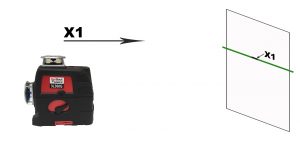
Place the laser level in the center of the room on a stable platform, ideally a tripod or solid surface. ย On some rotating lasers there may be arrows on the casing indicating the direction of the “X” and “Y” axis. ย If your laser does not have these markings pick a distinguishing feature of the laser. ย Such as the side the control panel is on or a handle. ย Direct your chosen side of the laser level at one of the walls. ย Power up the laser so it auto levels (for manual lasers manually level it up for each of the steps). ย Hopefully you can see the horizontal laser on that chosen wall.

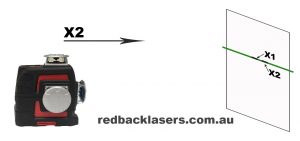
Attach a piece of paper on that wall and mark the height of the horizontal line, dot or rotating beam. ย Labeling it X1. ย NOTE: Its good practice when marking the position of a laser line/dot to always mark to the center of it and not one of the edges. ย Next rotate the body of the laser level 180 degrees (without changing the height of the tripod/surface) so the opposite side of the laser level body is now facing the wall with the piece of paper still attached. ย Power up the laser the same as before and mark the height on the paper and label X2.
laser level calibration laser level calibration 2

Laser Level Calibration 3laser level calibration 4

Second

Next rotate the body of the laser 90 degrees power up and mark the height of the laser and label Y1. ย Rotate the body of the laser 180 degrees to shine the opposite side of the laser to the wall and again mark the height as Y2. ย All four sides of the laser have now been marked. ย In principle all four marks made should be at exactly the same height, if they are then it is perfectly calibrated. ย If they are not at exactly the same height don’t panic it may still be within the tolerance of the laser. ย Measure the height difference between X1 and X2 and also Y1 and Y2.

Note it is quite possible that there is a difference between the X and Y axis measurements. ย If the distance is say 1mm, then divide it by 2 as the correct height should be exactly in the center of the height difference, so 0.5mm. ย The laser is in our example is 5m from the wall so the laser is 0.5mm out over 5m. ย Your laser instructions should have the accuracy tolerance printed in the specifications. ย Let us assume you laser has a tolerance of 3mm in 20 meters. ย Multiply the result by 4 so 0.5 x 4 = 2mm in 20m. ย So in this case you laser is within manufacturers tolerance. ย If you find your laser is outside tolerance then first repeat the process to confirm your findings. ย Then, if necessary get your laser calibrated by a laser level calibration specialist.

Here is a brief video demonstrating this principle of checking your horizontal line, dot or rotating laser at home. You can DOWNLOAD the featured self calibration check sheet HERE.

Checking Laser Level Calibration on-site

The second method I’m going to look at is more of an onsite check and is particularly applicable to 360 line or rotating lasers. ย This is something that should be done before any big job such as pouring a slab, it only takes a few minutes but can save much stress and expense.

First level you site as per normal and peg it out, string line or what ever you would normally do. ย Pick up your laser/tripod and move it over to the opposite side of the site, ideally having the opposite side of the laserย facing the center of the site. ย Power up and check your levels, they should be within the lasers tolerance. ย Also allow some tolerance for user inconsistency and receiver error. ย Ideally move the laser to a third spot and check again. ย This should be standard for any large scale levelling but is often overlooked with the assumption made that the laser level was good last time it was used so it should be good now.

Cross Line Laser Level Calibration Check

The third method I will look at is applicable for cross line lasers, horizontal line lasers that do not have 360 degree coverage. ย The aim of this method is to see if the horizontal line is indeed horizontal. ย In a room power up the laser and shine towards a wall and attach a piece of paper on the wall at the height the horizontal line is shining. ย Rotate the body of the laser so that the left edge of the line is just visible on the paper and mark the height. ย Carefully rotate the body of the laser so that the extreme right side of the laser line is now located on the paper and make another mark. ย If the height of both marks are the same or very close then you know that the horizontal line is ย good.

In most cases if the horizontal is good it is most likely that any vertical is also good. ย If your laser has more than one vertical you can check them against each other for consistency. ย The easiest way to do this at home is shine the verticals along a door frame or corner of the room. ย Check that each vertical gives the same result.

Checking Plumb

The last method I am going to look at here is for checking plumb, from floor to ceiling. ย Very simply place the laser which has a plumb function on the ground and mark on the floor the dot/cross. ย On the ceiling mark the up plumb dot/cross. ย Rotate the body of the laser three times 90 degrees looking at both the floor and ceiling and check to see that the laser provides a consistent plumb dot/cross compared to your original dot.

The methods outlined above will cover about 90% of all lasers. ย Allowing you the opportunity to quickly check the calibration of your laser level on site without specialist equipment. ย If you find that your laser does in fact need re calibration then get it done by a professional.ย  A Professional will often utilise a CCTV or optical calibration station.

For all your calibration requirements call RedBack Lasers Service on 1300 769 858

Tags: calibration
Share Post
  • Twitter
  • Facebook
  • Pinterest
  • Mail to friend
  • Linkedin
  • Whatsapp
Comparing Red & Green Las...
RedBack 3L360R 3L360G ultra bright red and green line lasers 360 3D Multi Line Laser
Using a Laser Receiver LRMULTI RedBack Lasers
Using a Laser Receiver Hand He...

Related posts

Concreting Laser Levels pefect for the professional concreter from RedBack Lasers
Guides
Read more

Concreting Lasers – Our ultimate guide for using a laser level for concrete pads!

March 25, 2024 0
  Make concreting easy with a RedBack laser level! Welcome to RedBack Lasers’ comprehensive guide on using auto-leveling lasers for concreting projects. Whether you’re a... Continue reading
RedBack Lasers earthmoving Machine Automation System Control with Single receiver system on Landplane Land Plane
Guides
Read more

Which Earthmoving Laser gear suits me best?

November 22, 2023 0
Lasers are one of the most efficient and effective ways to complete accurate Earthmoving.   To get the most out of your earthmoving equipmentย  –... Continue reading
Elmore Field Days 2023 RedBack Lasers
Guides
Read more

Earthmoving Machine Control Automation Systems

October 5, 2023 0
A Guide to Machine Control Automation Systems It has been possible to use laser level technology in combination with machine-mounted automation receivers to control the... Continue reading
Guides
Read more

The Ultimate Green Beam Multiline Laser with Servo Electronic Self Levelling

October 3, 2023 0
Ultimate Multiline Servo levelling Green Laser Level RedBack Lasers XLG44 Multiline Laser RedBack Lasers XLG44 is the most fully featured Green Multiline Laser currently available.ย ... Continue reading
Measuring Tools at the RedBack Lasers Shop, Thermometers, Thermal Image Camera, Paint thickness checker, stud finder scanner
Guides
Read more

New Measuring Tools in Stock on the RedBack lasers Shop

August 17, 2023
The RedBack Lasers Shop introduce a new range of quality Measuring Tools RedBack Lasers store now has an expanded range of Measuring Tools in stock.ย ... Continue reading

Comments are closed

Categories

  • Guides (39)
  • News (20)
  • Uncategorised (3)
redback-lasers-white-red-logo

Ph: 1800 769 858

Unit 2/20 Tarkin Court
Bell Park 3215 VIC

Procuret Finance

Procuret - Finance for eligible ABN holders

  • My Account
  • Contact
  • Laser Servicing & Calibration
  • News
  • Guides
  • Warranty
  • Terms & Conditions
  • Privacy
  • Cookie Policy (AU)
  • Privacy Statement (AU)
  • Disclaimer

ยฉ CMI Industries Pty Ltd 2022 – All Rights Reserved.

RedBack Lasers
Manage Cookie Consent

For best experiences, we use cookies to store and/or access device information. Consenting to these technologies will allow us to process data such as browsing behavior or unique IDs on this site. Not consenting may adversely affect certain features and functions.

Functional Always active
The technical storage or access is strictly necessary for the legitimate purpose of enabling the use of a specific service explicitly requested by the subscriber or user, or for the sole purpose of carrying out the transmission of a communication over an electronic communications network.
Preferences
The technical storage or access is necessary for the legitimate purpose of storing preferences that are not requested by the subscriber or user.
Statistics
The technical storage or access that is used exclusively for statistical purposes. The technical storage or access that is used exclusively for anonymous statistical purposes. Without a subpoena, voluntary compliance on the part of your Internet Service Provider, or additional records from a third party, information stored or retrieved for this purpose alone cannot usually be used to identify you.
Marketing
The technical storage or access is required to create user profiles to send advertising, or to track the user on a website or across several websites for similar marketing purposes.
  • Manage options
  • Manage services
  • Manage {vendor_count} vendors
  • Read more about these purposes
View preferences
  • {title}
  • {title}
  • {title}